Syslog connector
Class: syslog — RFC 3164 / RFC 5424 syslog over UDP or TCP. As a source, PADAS listens (or accepts sessions) and publishes parsed or raw events to a stream. As a sink, PADAS subscribes to a stream and forwards syslog-framed payloads to a remote receiver.
Create and edit under Sources and Sinks. Advanced Settings may expose more runtime options depending on deployment and permissions.
Source and sink behavior
| Role | Behavior |
|---|---|
| Source | Binds address:port in mode (udp, tcp, or both); maps messages into stream events using input_mode and related flags. |
| Sink | Client to address:port with mode udp or tcp only (not both); consumes the subscribed stream and forwards. |
| Streams | Align listener output and sink input stream ids with tasks / pipelines (Streams). |
Required fields
Every connector row
| Field | Required | Notes |
|---|---|---|
name | Yes | Display name; id derived from it. |
class | Yes | Must be syslog. |
stream | Yes | Resolved stream id. |
type | Yes | source or sink from the screen used at create time. |
config | Yes | Class-specific object; see below. |
Class syslog — required configuration (source)
| Setting | Required | Notes |
|---|---|---|
mode | Yes | udp, tcp, or both. |
address | Yes | Bind address (e.g. 0.0.0.0). |
port | Yes | Listen port. |
Class syslog — required configuration (sink)
| Setting | Required | Notes |
|---|---|---|
address | Yes | Receiver hostname or IP. |
port | Yes | Receiver port. |
mode | Yes | udp or tcp only. |
UI validation
Do not combine include_raw_data: true with input_mode: raw — the UI rejects this combination.
Create connector
- Open Sources or Sinks → Create.
- Set Class to Syslog, set name, stream behavior, and Enabled.
- For a source, set Listen mode / ingest options and bind address / port (often under Common configuration). For a sink, set remote address, port, and mode (
udp/tcp). - Add TLS, buffers, and batching when shown.
- Save, then wire the stream into tasks / pipelines.
Source (UI)
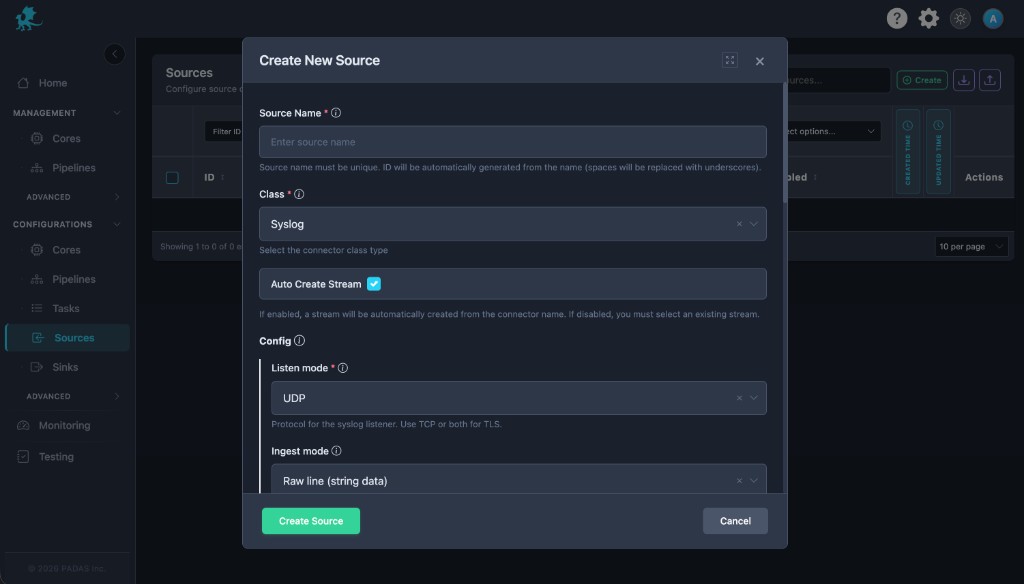
| UI field | Connector setting |
|---|---|
| Listen mode (required) | mode (udp / tcp / …) |
| Ingest mode | input_mode and related structured/raw flags |
Address, port, TLS, and buffer rows often appear under Common configuration or additional rows in the same modal.
Sink (UI)
The sink form is forwarding-oriented (remote host, port, protocol, TLS)—it does not mirror the source Listen mode / Ingest mode screenshot. Confirm labels in the UI or an exported bundle for your build.
Configuration
Transport
mode,address,port— Listen vs forward roles as above.
Message shape (source)
input_mode,include_raw_data,routing_rules— Parsed vs raw retention and optional routing.
Throughput and backpressure
buffer.max_events,workers— Queue depth and parallelism.
Timestamps (source)
timestamp— Optional extraction or override (enabled,field,format,regex, …).
TLS
tls—enabled,ca_file,cert_file,key_filefor encrypted syslog when supported.
Sink batching
batch—max_events,timeout_ms, and related caps to group forwards.
Runtime behavior
- Listeners and forwarders start after deployment when Enabled is on.
- Sources accept datagrams or TCP sessions; sinks open outbound clients to the collector.
- Buffer and worker settings affect how bursts are absorbed before the stream stage.
Performance and operational notes
- Prefer TCP when you need backpressure and framing guarantees; UDP is fire-and-forget.
- Size
buffer.max_eventsto peak EPS and downstream stream capacity. - Validate TLS trust chains for receivers that require client auth.
Related pages
- Sources · Sinks
- padas-registry-quickstart.json — example
syslogsource/sink entries - Architecture — Connectors