File connector
Class: file — reads or writes line-oriented or delimited files on disk. As a source connector, PADAS tails or batches files and publishes events to a stream. As a sink connector, PADAS subscribes to a stream and writes or appends output according to your build (paths, rotation, append semantics).
Create and edit under Sources and Sinks. Advanced Settings may expose additional runtime options depending on deployment and permissions.
Source and sink behavior
| Role | Behavior |
|---|---|
| Source | Ingest from path (file or directory); optional pattern / recursion / watch for discovery; events go to the connector’s output stream. |
| Sink | Consume from the subscribed stream; deliver to disk using path / pattern plus rotation, append, and batching options defined for your build. |
| Streams | Sources write into a stream; sinks read from a stream. Align stream ids with tasks and pipelines (Streams). |
Required fields
Every connector row
| Field | Required | Notes |
|---|---|---|
name | Yes | Display name; id is derived (spaces → underscores). |
class | Yes | Must be file. |
stream | Yes | Resolved stream id (use Auto Create Stream or pick an existing stream). |
type | Yes | source or sink (set by Sources vs Sinks; immutable after create on Core). |
config | Yes | Class-specific object; see below. |
Class file — required configuration
| Setting | Required | Notes |
|---|---|---|
path | Yes | File or directory path. |
Other file keys (pattern, recursive, watch_changes, …) are optional with Core defaults.
Create connector
- Open Sources or Sinks → Create.
- Set Class to File, name the connector, and set Auto Create Stream / stream as needed (Sources, Sinks).
- Set Enabled when the connector should run after deployment.
- Fill Config (minimum
path). - Save, then reference the stream from tasks / pipelines.
Source (UI)
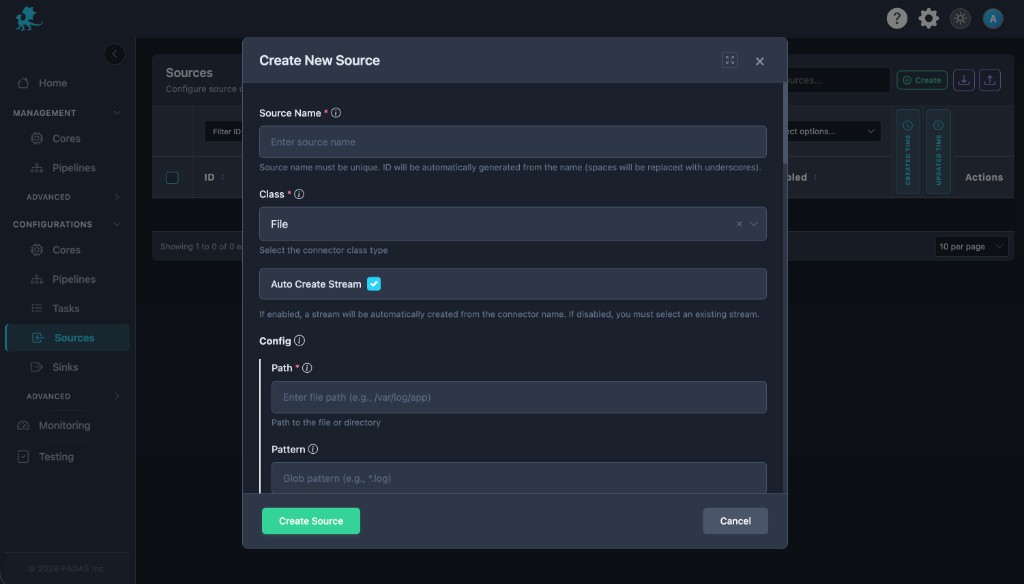
| UI field | Connector setting |
|---|---|
| Path (required) | path |
| Pattern | pattern (glob under path) |
Sink (UI)
The sink modal uses the same Path / Pattern pair for this class.
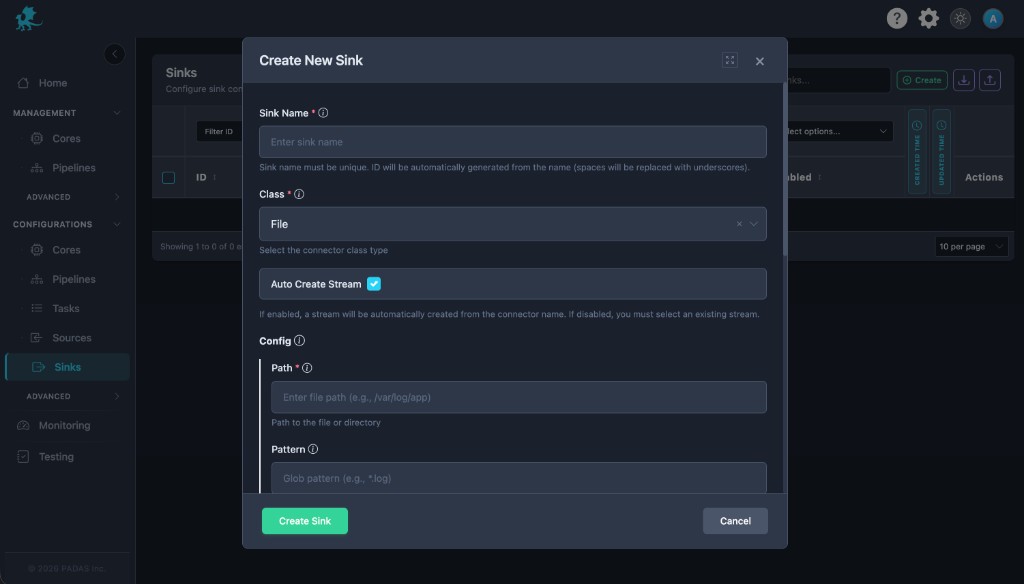
Further keys (tail, checkpointing, encoding, multiline, fingerprints, buffers, workers) appear under Common configuration, Advanced Settings, or exported configuration—confirm labels for your build.
Configuration
Path and discovery
path,pattern,recursive,watch_changes— What to read or watch.
Read semantics (source)
read_from,checkpointing,checkpoint_dir— Start position and durable offsets.encoding,line_delimiter,max_line_bytes,max_read_bytes— Parsing limits.
Multiline and fingerprints (source)
multiline—start_pattern,mode,condition_pattern,timeout_msfor wrapped logs.fingerprint— Stable identity across rotation (strategy, hash lengths, ignored header bytes).
Throughput
buffer.max_events,workers,preserve_order— Backpressure and ordering.
Sink-oriented (sink)
When file is a sink, config typically adds rotation, append, and batching on top of Path / Pattern—confirm keys in the UI or an exported bundle for your release.
Runtime behavior
- The connector runs after deployment to a Core and when Enabled is on.
- Sources publish parsed lines/events to the bound stream; sinks drain the subscribed stream and write to disk.
- Misaligned stream ids mean tasks never see sink output or sources never feed downstream work.
Performance and operational notes
- Prefer checkpointing for tail sources so restarts do not reread or skip incorrectly.
- Size
buffer,workers, andmax_read_bytesto disk throughput and downstream stream capacity. - For sinks, align rotation and batch sizes with filesystem limits and archival policies.