Sources
Sources (/sources) defines source connectors: they ingest data from external systems, normalize it into PADAS events, and publish to a stream. Pipelines and tasks consume those streams; sinks handle outbound delivery on the other side of a pipeline.
What is a source connector?
| Concept | Description |
|---|---|
| Role | Ingress connector: receives data from outside PADAS. |
| Behavior | Converts input into events and writes them to an output stream. |
| Reuse | Stored as a registry object; referenced by connector id and by stream id from tasks and pipelines. |
| Class | Connector class (for example syslog, http, kafka) selects protocol, defaults, and which runtime configuration fields appear. |
Sources list
Open Sources. Use Create to add a connector; row Actions support view, edit, clone, and delete. Filters sit under column headers; the footer shows counts and paging.
Create → Create a source connector.
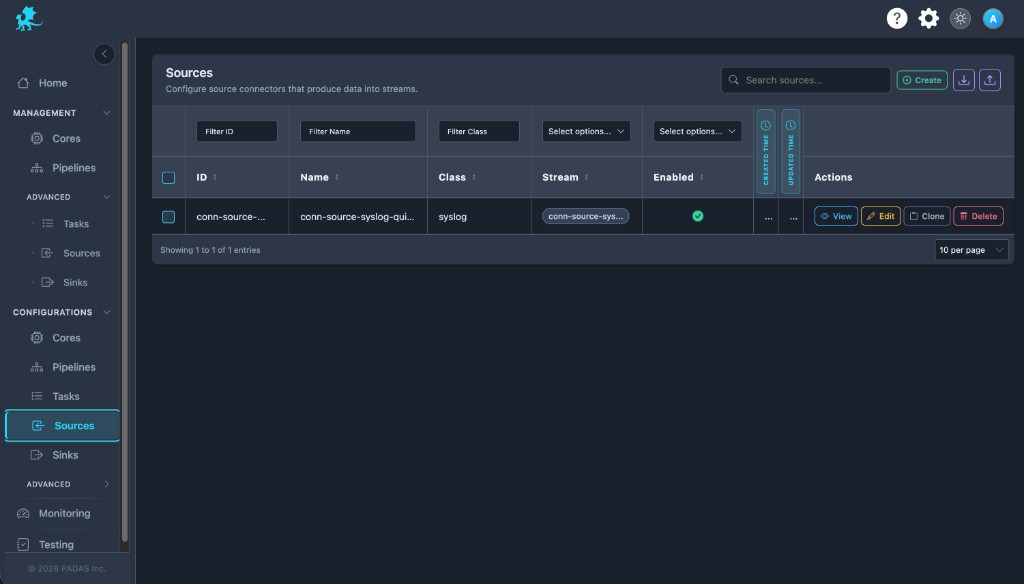
On these Configurations screens the layout is the same: Search and Create in the toolbar, Download / Upload for registry JSON (a full bundle can be imported from any tab), then a grid with filters on the row under the headers.
Each row has View (read-only), Edit, Clone, and Delete. Select multiple rows when you need bulk delete. Created and Updated time may show as narrow strips; use the control at the side of the table to expand or collapse those columns.
| Column | Description |
|---|---|
| ID | Connector id in the registry and API. |
| Name | Human-readable source name. |
| Class | Connector class (for example syslog, http). |
| Stream | Output stream this source publishes to. |
| Enabled | Whether the connector is allowed to run when deployed. |
| Created Time / Updated Time | Audit timestamps. |
| Actions | View, Edit, Clone, Delete. |
Create a source connector
- Choose a unique Source Name (drives the registry
id). - Select Class — pick the ingestion type; this controls the rest of the form.
- Set stream behavior with Auto Create Stream (see Stream behavior).
- Complete Config — networking, authentication, parsing, and class-specific options (see Configuration model).
- Set Enabled if the connector should run once deployed.
- Save. Reference the resulting stream (and connector id) from tasks and pipelines when you build the workflow.
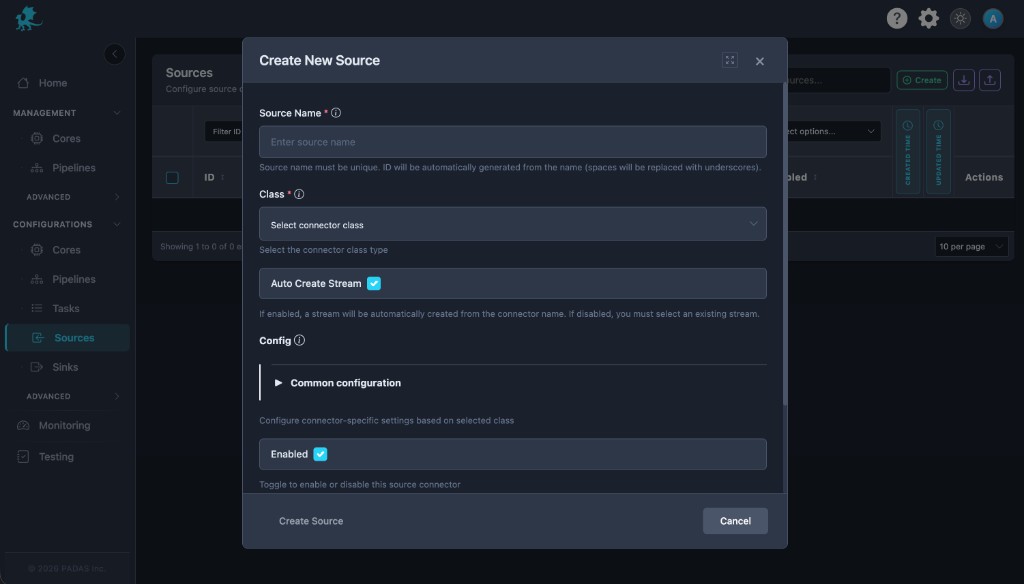
Modal actions: Create Source and Cancel.
Stream behavior
Auto Create Stream controls how the output stream is chosen:
| Toggle | Behavior |
|---|---|
| Enabled | PADAS creates a stream automatically, typically derived from the connector name. That stream becomes the connector’s output stream and appears in the Stream column after save. |
| Disabled | You must select an existing stream from the registry. The connector publishes only to that stream id. |
Keep stream naming consistent with how tasks wire source_stream and how pipelines align connectors, or events will not reach the intended processing path (Streams).
Connector classes
Each connector class implements a different ingestion path (protocol, client libraries, auth). The class determines which configuration blocks appear in the UI and how the runtime opens listeners or polls endpoints.
| Class | Role | Documentation |
|---|---|---|
akamai | Akamai SIEM (EdgeGrid, NDJSON offset poll) | Akamai SIEM connector |
file | File tail or batch read | File connector |
http | REST client poll (JSON) | HTTP connector |
http_server | HTTPS listen POST ingest (JSON / NDJSON / text) | HTTP server connector |
kafka | Kafka consumer | Kafka connector |
padas | PADAS TCP (MessagePack) | PADAS connector |
splunk | Splunk-oriented ingest | Splunk connector |
syslog | UDP/TCP syslog (RFC 3164 / 5424) | Syslog connector |
See Connector classes for the full matrix (sources and sinks).
Configuration model
Config holds runtime-oriented settings: hosts, ports, TLS, credentials, batching, and class-specific parsers. Exact fields vary by connector class—use the class page linked above for authoritative keys and examples.
| Stored field | UI | Notes |
|---|---|---|
id | Derived from Source Name | Spaces typically become underscores. |
name | Source Name | Required; unique among sources. |
class | Class | Required; pick from supported source classes. |
auto_create_stream | Auto Create Stream | See Stream behavior. |
stream | Stream picker or auto result | Target output stream id. |
config | Config sections in the modal | Class-specific and common blocks. |
enabled | Enabled | Master toggle for this connector. |
description | Optional description | When exposed in the UI. |
Advanced Settings — Additional runtime controls (for example capacity, buffering, or deployment-specific knobs) may appear when your role and deployment model allow; they complement the modal Config and are edited from advanced management screens when available.
Runtime considerations
- A source definition in Configurations is not live ingestion by itself; the connector runs after it is deployed to a Core and the runtime starts it.
- Disabled connectors do not ingest traffic even if deployed.
- Connectors publish events into their output stream; tasks and pipelines consume those streams downstream.
- Do not delete a source connector while a pipeline or task still depends on its connector id or output stream.
Related pages
- Sinks — outbound connectors
- Pipelines and Tasks — how streams are consumed
- Streams — stream ids and wiring
- Architecture — Data plane — how ingress fits in a Core instance