Pipelines
Management → Pipelines is the pipeline Deploy / Sync / Remove surface: you Deploy a registry pipeline to selected Core(s) (silent bind + scoped push of its constituents), Sync when fingerprint drift appears (pipeline-scoped reconcile), and Remove it from Core(s) (unbind + scoped delete). Pipelines are UI-only—they are never Core registry entities. Use this page to coordinate multi-Core rollout of a pipeline’s members—not to author graph topology or to replace the live operations graph.
Architecture context
| Layer | Responsibility |
|---|---|
| Control plane | Stores pipeline definitions, membership (which Core(s)), and last-sync display; drives entity Deploy / Sync / Remove. |
| Core runtimes | Receive expanded streams / tasks / connectors only—never a pipeline object; run workload execution when started. |
| UI readback | Runtime state and fingerprint drift are reported back from Cores and surfaced in Status, tags, and Core Actions. |
- Deploy binds (if needed) and pushes constituents; it does not start workload execution.
- Pipelines are UI-only — Core sync/fingerprint sets are the expanded flat members only.
- Execution (Start / Stop / Restart) is controlled separately (Core Actions and Control Tower).
- There is no Assign-only happy path on this page.
- Deploy is hidden when every available Core already has this pipeline (no deploy target left).
What this page manages
| Surface | Role |
|---|---|
| Pipelines | Pipeline topology authoring (sources, tasks, sinks, wiring). |
| Management → Cores | Core Deploy / Sync / Remove — add entities, equalize desired set (including orphan delete), or selectively drop assigned workloads. |
| Control Tower (and Core-local controls) | Live execution graph, per-stage health, runtime diagnostics; Home Apply / Link for membership without Deploy. |
| This page | Entity Deploy / Sync / Remove for a pipeline: silent bind + scoped constituent push, pipeline-scoped reconcile, or unbind + scoped delete; row Status and Core Actions. |
Deploy lifecycle
At a high level the control plane moves a pipeline from definition to running workloads through distinct steps. Registry edits never auto-push to engines.
| Stage | Operator view |
|---|---|
| No bound Cores | Row shows no engines; Deploy (or Home Apply / Link) is the next membership step. |
| Needs deploy | Desired fingerprint differs from observed on one or more Cores; run Sync for this pipeline (scoped reconcile), or Deploy to add to additional Core(s). |
| Ready to start | Registry parity is current; pipeline is stopped—use Start when you want execution. |
| Running | Workload execution active on at least one Core; use Stop / Restart as needed. |
| Drift detected | Tags or Status show fingerprint drift or split health—Sync / Deploy and per-Core triage. |
Deploy vs Sync vs Remove vs Start
| Step | Updates membership | Pushes to Core(s) | Changes execution state |
|---|---|---|---|
| Deploy (this page) | Yes (silent bind if needed) | Yes — scoped to this pipeline’s constituents only; core picker excludes already-bound Cores | No |
| Sync (this page, when needs deploy) | Uses current membership | Yes — pipeline-scoped reconcile: push missing, PUT drifted, DELETE unshared constituents dropped from composition | No |
| Sync (Cores) | Uses current desired set | Yes — equalize desired set including orphan DELETE | No |
| Remove (this page) | Yes (unbind) | Yes — scoped delete of this pipeline’s unshared constituents | No |
| Core Actions (Start / Stop / Restart) | — | Uses last successful sync/deploy | Yes |
Core equalize remains on Cores; this page focuses on the pipeline as an entity Deploy / Sync / Remove unit. Home Apply Pipeline (submit Create) = create + bind; Link Pipeline = bind-only—neither Deploy/Start nor Remove on Home.
Pipeline inventory
The grid is the orchestration console for pipeline rows: scan bound Cores, Status, and actions before a rollout or incident.
| Column | What operators use it for |
|---|---|
| ID / Name | Stable registry identity for the pipeline definition (UI registry). |
| Source / Tasks / Sinks | Quick read of graph members (who participates; these are what Core receives). |
| Actions | Sync (when needs deploy), Deploy (when an unbound Core remains), Remove (when membership exists). |
| Bound Cores | Which engines are in membership; warning or stale cues flag per-Core fingerprint issues—open tags for detail when N Cores disagree. |
| Status | Rolled-up deployment and execution summary (Runtime status); not a substitute for Control Tower stage drill-down. |
| Deployed Time | Last successful sync/deploy for display/ops—not the needs-deploy decision. Assigned Time is retired. |
| Core Actions | Start / Stop / Restart for this pipeline’s workload execution on the bound Core(s)—orthogonal to Deploy. |
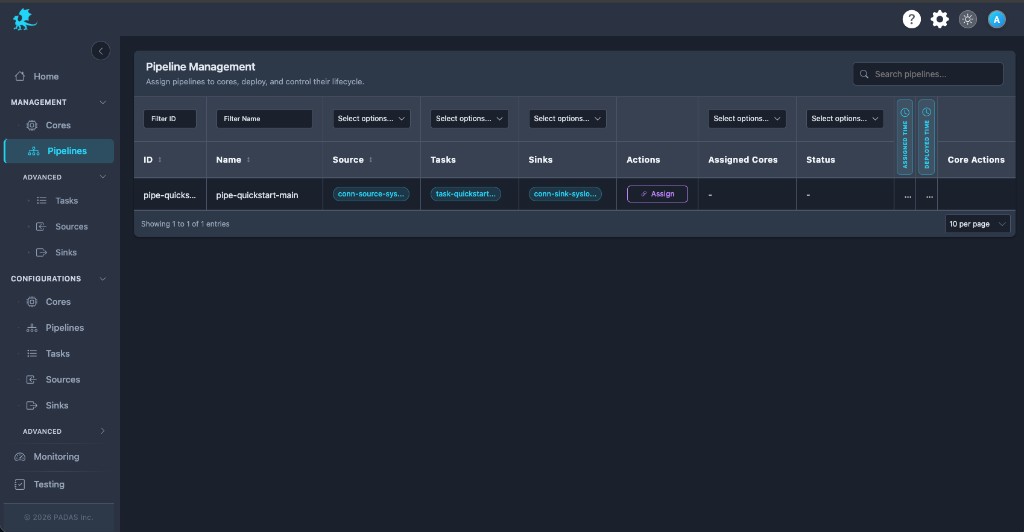
Deploy supports one-to-many Core membership; each Core keeps independent registry and fingerprint state. After Remove, shared constituents that other pipelines still need may remain on the Core (success toast may mention retained ids).
Needs deploy and sync state
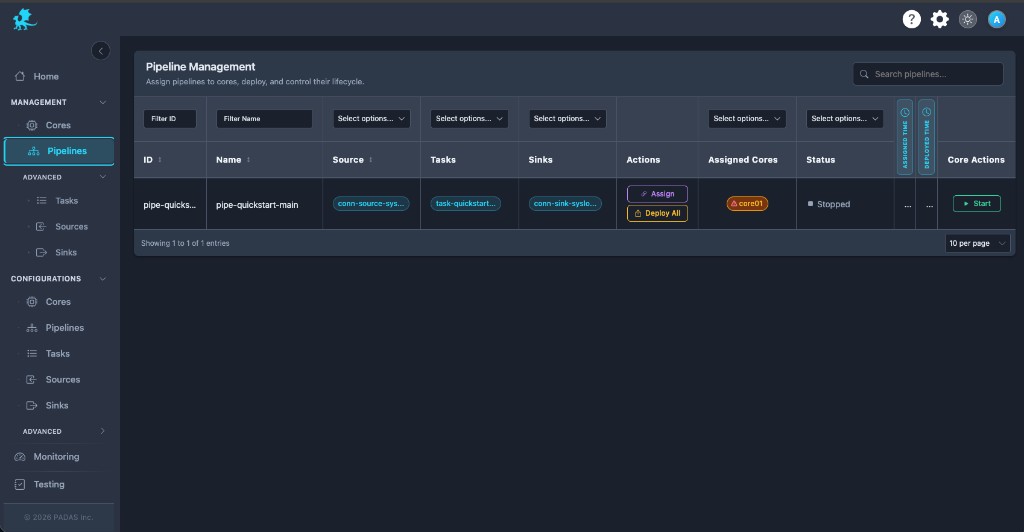
Needs deploy means the desired fingerprint for the expanded members differs from the observed registry on one or more Cores. It is not Assigned Time comparison.
| Behavior | Detail |
|---|---|
| Per-Core tracking | Each bound Core tracks parity independently; one engine can be current while another lags. |
| During Deploy / Sync | Runtime execution on a Core continues with the previous registry revision until the push completes successfully for that slice. |
| Operator cues | Expect Sync when drift is on, Deploy when an unbound Core remains, Core-tag warnings, and Status values such as Needs deploy or Out of Sync. |
| Scope | Entity Deploy must not full-reconcile the Core or orphan-DELETE unrelated entities; pipeline Sync only deletes unshared constituents dropped from this composition. Core extras leave via Remove. |
Runtime status
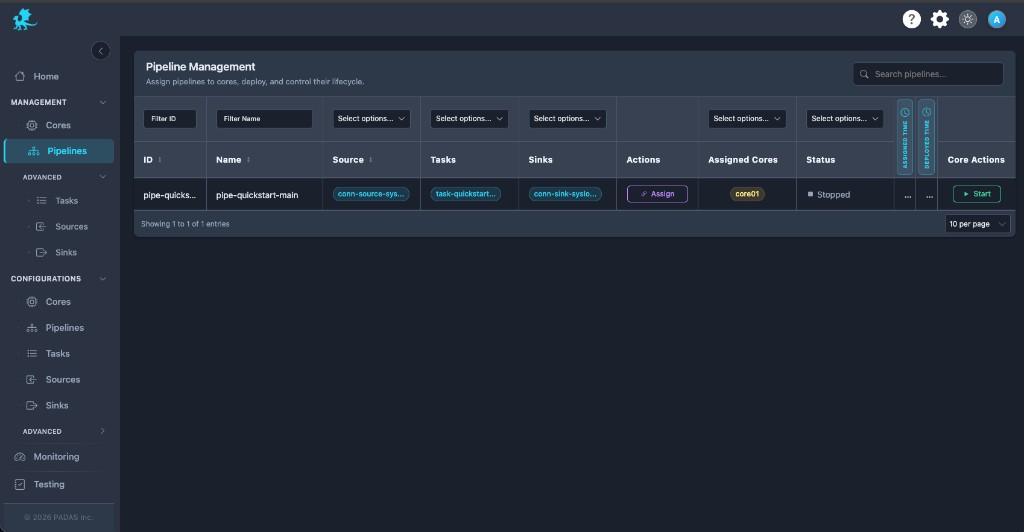
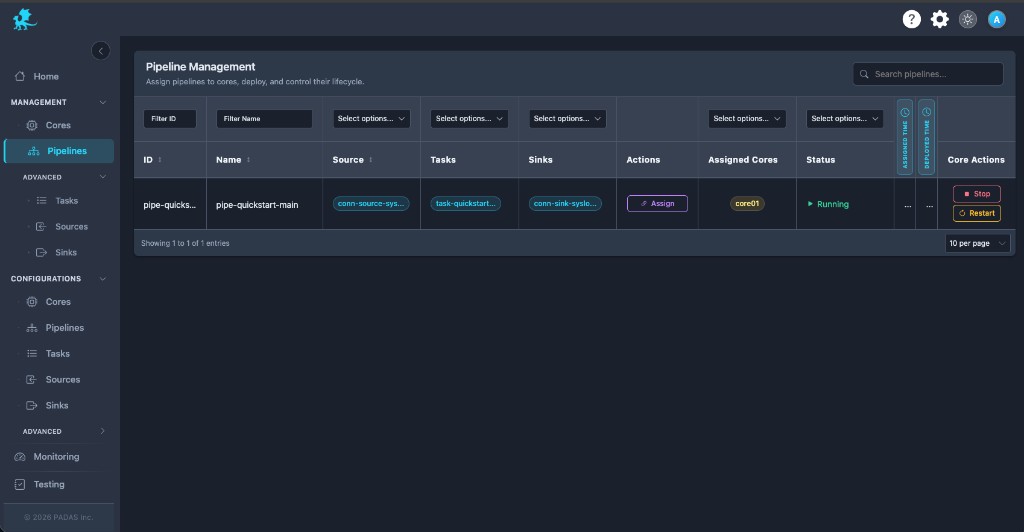
Running and registry parity are separate dimensions: a pipeline can be fully synced but stopped, or running on one Core while another shows different runtime state.
| Status (examples) | Operational meaning |
|---|---|
| Running | Execution state shows active workload on ≥1 bound Core. |
| Partially Running | Split rollout or health—some Cores running, others stopped or unhealthy. |
| Stopped | Execution idle; constituents may still be present on the engine. |
| Failed | Pipeline-scoped fault surfaced in the row aggregate—investigate per-Core tags and logs. |
| Needs deploy | Fingerprint drift—run Sync (or Deploy to add Core(s)). |
| Out of Sync | Drift between desired and observed on at least one Core. |
Different Cores may report different runtime states for the same pipeline row—use bound-Core drill-down and Control Tower for live topology.
Components after pipeline Deploy
Deploy / Sync push the pipeline’s constituents (streams / tasks / connectors) to bound Cores. They do not automatically activate every source, task, and sink: those units can have independent runtime state and may still need Advanced (or equivalent) start flows before data moves end-to-end.
Multi-Core behavior
- One pipeline row can bind to multiple Cores; parity is per engine.
- Deploy may succeed on subset A while Core B still shows needs deploy—resolve B before assuming a uniform rollout.
- Core Actions apply in the product’s defined scope (often per selection or row); confirm behavior in your release when operating distributed runtime topologies.
Operational workflow
Treat this screen as a rollout checklist:
- Confirm bound Cores match the intended orchestration footprint.
- Scan Status and Core tags for needs deploy or Out of Sync.
- Run Sync until drift cues clear for this pipeline—or Deploy to add unbound Core(s); use Cores when equalizing the whole Core desired set.
- Verify runtime status matches expectations before deep runtime troubleshooting on Control Tower.
- Use Core Actions to start or stop workload execution when registry parity is current.
- After registry edits, repeat Sync / Deploy; use Remove to unbind + scoped-delete; reconcile multi-Core failures independently.
Related pages
- Management → Cores — Deploy, Sync, Remove, and Core needs deploy
- Cores — engine registration
- Pipelines — registry topology definitions
- Control Tower — live operations graph; Home Apply / Link
- Advanced — connector / component start surfaces