Cores
In Padas UI, the console, Management → Cores is the registry sync surface for each registered Motion Engine (console: Cores; tree: core/). You equalize drift with Sync, add workloads with Deploy, and unbind + delete with Remove. Needs deploy comes from fingerprint drift. This page does not author pipeline topology or replace live runtime graphs—that work lives under Configurations and Control Tower.
Architecture context
| Layer | Role |
|---|---|
| Padas UI (console and control plane) | Stores the operator desired set, drives Deploy / Sync / Remove to each Core, and surfaces fingerprint drift. |
| Motion Engine | Holds its own runtime registry after push; runs workloads only after runtime activation. |
| This page | Per-Core Deploy (add), Sync (equalize + orphan delete), Remove (selective drop) — not stream processing itself. |
- Sync makes this Core match the UI desired set (including orphan delete); it does not start runtime execution.
- Remove is the selective drop path. Core Sync is the bulk equalize (orphans included).
- Runtime activation (start / stop) is separate—use Advanced after the registry is current.
What this page manages
| Topic | Where |
|---|---|
| Core Deploy / Sync / Remove | This page — per Core row. |
| Entity Deploy / Sync / Remove (scoped bind + push, equalize, or unbind + delete) | Tasks / Sources / Sinks / Management → Pipelines |
| Pipeline topology (graph authoring) | Pipelines |
| Engine registration (Host / Port) + enroll | Services → Cores — enroll the engine |
| Live execution graph and pipeline-level controls | Control Tower |
Sync lifecycle
At a high level: define registry objects → bind membership (via entity Deploy, Core Deploy, Home Add-entity packages, or Home pipeline Apply/Link) → Sync when drift appears → activate execution elsewhere. Use Remove to drop workloads from the Core.
| Step | Meaning |
|---|---|
| Membership | Desired placement is written as transactional silent bind inside entity Deploy, Core Deploy, or Home Add-entity packages (bind rolls back if push fails). Home Apply / Link for pipelines may bind without push. |
| Sync | Row Sync (when needs deploy) equalizes this Core’s desired set (pipelines expand to flat streams / tasks / connectors) and deletes orphans not in that set. Empty desired set wipes after confirm. |
| Activation | Advanced start / stop controls runtime execution after a successful sync/deploy. |
Sync vs Deploy vs Remove vs Start
Do not conflate the three registry gestures:
| Action | Where | Scope | Runtime activation |
|---|---|---|---|
| Sync | This page (when needs deploy) | Equalize desired set including orphan DELETE (empty = wipe with confirm) | No |
| Deploy | This page + Tasks / Sources / Sinks / Pipelines | Silent bind (if needed) + push selected / that entity (transactional — new bind rolls back if push fails); hidden when there is no deploy target | No |
| Remove | This page + Tasks / Sources / Sinks / Pipelines | Selective unbind + scoped delete; hidden when nothing is assigned. Not on Home | No |
| Start / Stop (Advanced) | Advanced / Core Actions | Uses last successful sync/deploy | Yes |
Core inventory
Scan rows for connectivity, bound workloads, and needs deploy before incident deep dives.
| Column | Use |
|---|---|
| Core ID / Name | Stable row identity and operator label. |
| Host / Port | Management endpoint—should match Cores registration. |
| Sources / Tasks / Sinks | Workloads in the UI desired set for this Core. |
| Deployed Time | Last successful sync/deploy timestamp for display/ops—not the needs-deploy decision. |
| Actions | Sync (when needs deploy), Deploy (when catalog has entities not yet on this Core), Remove (when this Core has assigned entities). |
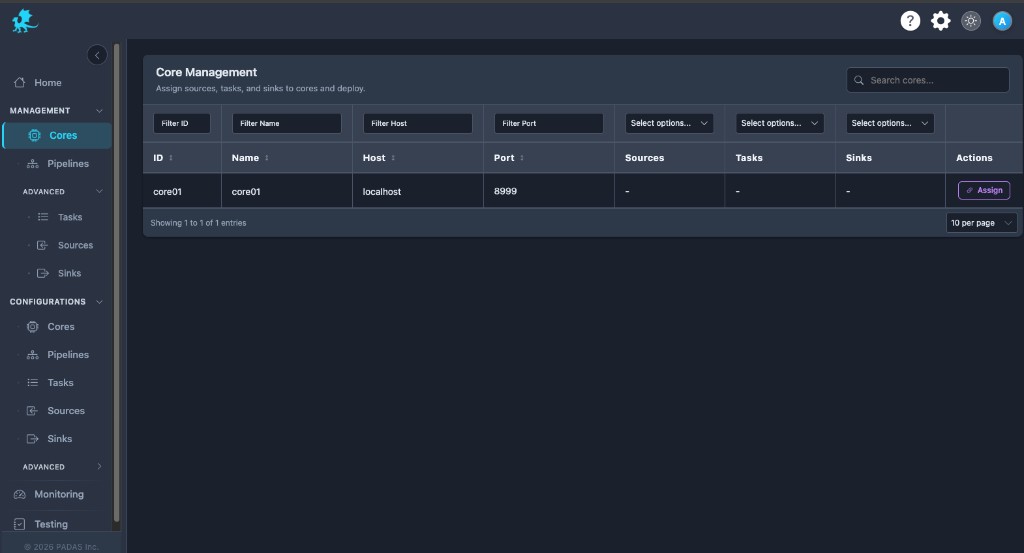
Filters and search behave like other Management grids.
Working with Deploy, Sync, and Remove
| Control | Effect |
|---|---|
| Deploy | Modal with three dropdowns (tasks / sources / sinks). Dropdowns start empty; options are entities not yet on this Core. Select what to bind + push (transactional). Empty submit forbidden. Hidden when there is nothing left to add. |
| Sync | Equalize this Core’s registry to the UI desired set (including orphan DELETE). Confirm warns orphans will be removed. Empty desired set wipes after confirm. |
| Remove | Same three-dropdown shape; options are entities already assigned to this Core. Select what to unbind + delete. Empty submit forbidden. Hidden when nothing is assigned. Selective — does not require Sync. |
Until Sync/Deploy completes, the engine can keep the previous registry revision for affected objects. Membership for individual workloads is added via Deploy or Home flows—not by an Assign-only step on this page.
Needs deploy (fingerprint drift)
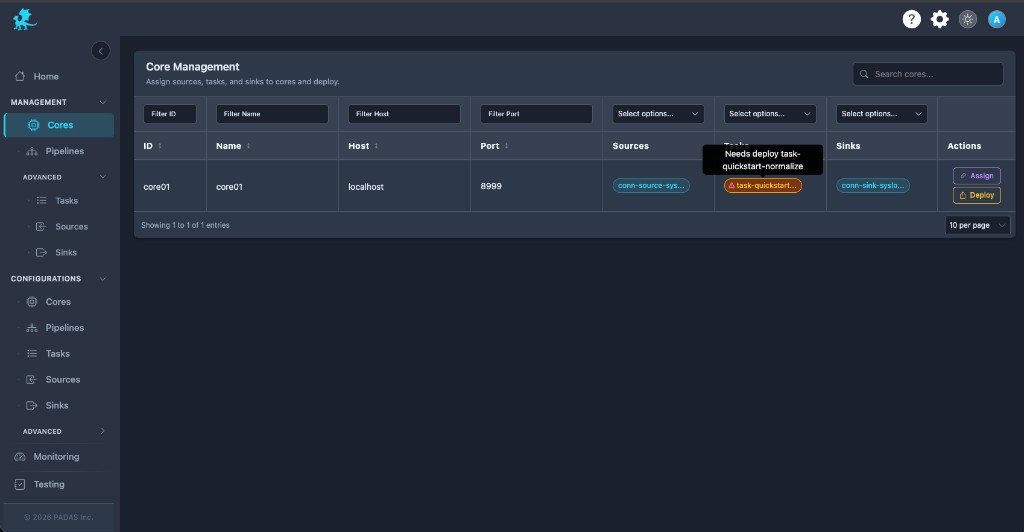
Needs deploy means the desired fingerprint differs from the observed fingerprint for the Core’s desired set. It is not driven by Assigned Time (that column is retired). Core reachability is shown by runtime status, not a separate unreachable chip.
| Behavior | Detail |
|---|---|
| Decision | Aggregate fingerprint of the desired set vs service; when they differ, per-entity fingerprints identify missing / changed ids. |
| No observe yet | Without a fingerprint compare, needs-deploy stays off (do not invent drift). |
| During Sync | Runtime execution can keep using the prior registry revision until Sync finishes successfully. |
| Operator response | Run row Sync to equalize drift; use Deploy to add missing catalog entities; use Remove to drop extras. For a single workload, prefer entity actions on Tasks / Sources / Sinks / Pipelines. |
| Secrets | Secret-only edits may not light needs-deploy (fingerprint omits sensitive fields); Configurations save confirm asks you to Deploy when only secrets change. Mixed edits (secret + non-secret) rely on fingerprint/needs-deploy instead. Configurations do not show needs-deploy chips. |
Relationship to pipelines
| Surface | Responsibility |
|---|---|
| Cores | Deploy / Sync / Remove for flat streams / tasks / connectors. Pipelines are UI-only and are never Core registry entities. |
| Pipelines | Pipeline Deploy / Sync / Remove (bind + constituent push, scoped reconcile, or unbind + scoped delete). |
| Control Tower | Runtime execution visibility — live topology, stage health, graph-level actions on the selected Core; Home Apply / Link for pipeline membership. |
Core Sync expands pipeline membership into the flat desired set; it does not push a pipeline object to the engine.
Activation after sync
Sync / Deploy alone do not start workloads. After registry parity is current, use Advanced (Tasks, Sources, Sinks) for runtime activation. Control Tower complements this with pipeline execution visibility and controls when pipelines are attached.
Operational workflow
- Verify engine connectivity — Host / Port align with Cores.
- Review desired-set workloads — tags show sources, tasks, sinks bound for each row.
- Check needs deploy — clear fingerprint drift before trusting registry parity.
- Deploy / Sync / Remove — add with Deploy, equalize with Sync, drop extras with Remove; use entity pages for single-workload scope.
- Start workloads — Advanced when execution should run.
- Observe behavior — Control Tower and Pipelines status for graph-level posture.
Related pages
- Cores — register engines
- Pipelines — registry pipeline topology (UI-only composition)
- Management → Pipelines — pipeline Deploy, Sync, and Remove
- Management → Advanced — workload start / stop
- Control Tower — live graph, Home Apply / Link