Streams
Streams (/streams) defines streams: PADAS’s internal event transport between sources, tasks, and sinks. Sources publish events into streams; tasks consume from one stream and publish to others; sinks subscribe to streams for delivery. That layout decouples ingestion, processing, and delivery so each stage can be tuned, scaled, and reasoned about on its own.
Streams are reusable runtime infrastructure: the same stream id can be shared by several components, while WAL and buffer settings define durability, replay, and backpressure for that channel.
Open this screen when you need explicit durability and replay tuning, retention and disk control, throughput-oriented WAL and batch choices, or buffering behavior beyond defaults from padas.toml or connector auto_create_stream.
Background: Core concepts → Streams, Architecture → Data flow. Operator defaults: Motion Engine TOML.
What is a stream?
| Concept | Description |
|---|---|
| Role | A logical event transport channel—append-only event flow inside the runtime. |
| Decoupling | Stream-based boundaries between producers and consumers; no tight coupling between connector and task implementations. |
| Reuse | One stream id can feed multiple tasks or sinks, or receive from multiple publishers, depending on topology. |
| Durability | Optional WAL-backed persistence enables replay and crash recovery; without WAL, semantics favor lower latency and less disk use. |
| Flow control | Buffers absorb bursts; when full, backpressure (block, drop, or timeout—per product defaults) protects the runtime. |
Streams list
Open Streams. Use Create for a new stream; use header filters and footer paging like other configuration grids.
Create → Create a stream.
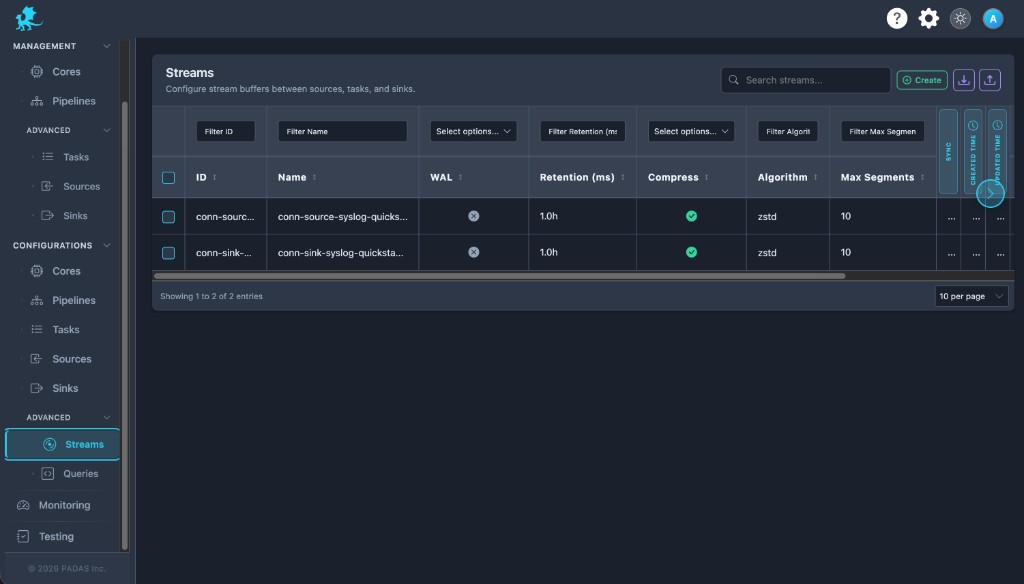
On these Configurations screens the layout is the same: Search and Create in the toolbar, Download / Upload for registry JSON (a full bundle can be imported from any tab), then a grid with filters on the row under the headers.
Each row has View (read-only), Edit, Clone, and Delete. Select multiple rows when you need bulk delete. Created and Updated time may show as narrow strips; use the control at the side of the table to expand or collapse those columns.
| Column | Description |
|---|---|
| ID | Stable stream identifier referenced by sources, sinks, tasks, and pipelines. |
| Name | Human-readable label (often aligned with id when created in the UI). |
| WAL | Whether write-ahead logging is enabled for this stream. |
| Retention (ms) | Retention policy window for WAL history (when WAL is on). |
| Compress / Algorithm | Compression for WAL segments and codec (for example zstd). |
| Max segments | Upper bound on WAL segment files—runtime durability and disk cap. |
| Sync | Synchronous WAL flushes: stronger durability, higher latency cost. |
| Created time / Updated time | Audit timestamps. |
| Actions | View, Edit, Clone, Delete. |
Column labels can vary slightly by build; the Create / Edit form shows the authoritative Advanced Settings fields.
Create a stream
- Enter a unique Stream Name (the UI derives the stable
id, commonly spaces → underscores). - In Advanced Settings, configure WAL (on/off and related fields)—see WAL and durability.
- Set retention, compression, max segments, and sync to match your replay and disk goals.
- Configure buffer limits and backpressure-related mode where exposed—see Buffering and backpressure.
- Save, then reference the stream
idfrom sources, tasks, sinks, and pipelines in your deployment configuration.
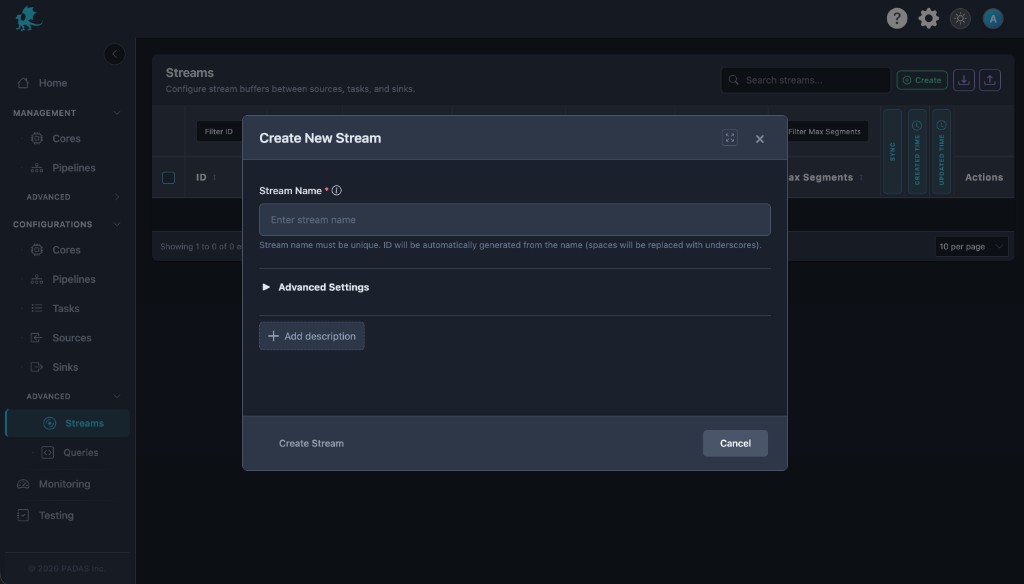
Stream Name (required) — Must be unique. Downstream objects store references by id; keep identifiers stable once production event flow depends on them.
Add description — Optional operator notes.
Advanced Settings — Expand for the full WAL and buffer form (the list view shows summary columns only). Batch options (when shown) tune how WAL data is grouped before flush and interact with throughput and latency.
WAL and durability
The write-ahead log (WAL) is the primary operational lever for durability and replay on a stream.
| Setting | Role |
|---|---|
| WAL enabled | Persists events to disk, survives process restarts, and supports replay from retained history. When off, the stream behaves more like a transient runtime channel (faster, less durable). |
| Retention (ms) | Defines how long WAL history is kept—your effective replay window for earliest and offset-based reads. Too short truncates recoverable history; too long grows disk use. |
| Compression / algorithm | Reduces segment size on disk at CPU cost—important for high-volume WAL-backed streams. |
| Sync writes | Favors durability (fewer lost in-flight events on crash) at the expense of latency and sustained write throughput. |
| Max segments | Caps segment file count for this stream—bounds disk growth together with retention. |
WAL-backed streams support earliest, offset-based, and latest consumption semantics; details: Core concepts → Positions and offsets.
| Goal | Direction |
|---|---|
| Replay and recovery | Enable WAL, size retention to the window you must be able to re-read, and weigh sync vs batch latency. |
| Lowest latency, acceptable loss on crash | Disable WAL; still tune buffers if producers block or drop. |
| Disk pressure | Shorten retention, enable compression, and lower max segments. |
Buffering and backpressure
Each stream path uses bounded buffers in front of the logical channel. They absorb bursts so short spikes do not immediately stall producers, and they participate in backpressure when sustained load exceeds downstream capacity.
| Topic | Behavior |
|---|---|
| Bursts | A larger buffer smooths momentary spikes; it does not remove the need to right-size WAL and tasks for sustained rates. |
| Producer throughput | When consumers slow, filled buffers change how much work sources and tasks can push—event flow aligns with real capacity. |
| Backpressure | Protects the runtime from unbounded memory growth. Typical modes (block, drop, timeout) determine whether producers pause, lose events, or wait briefly before dropping—exact mapping follows the live UI and engine. |
| Sizing | Max events, max bytes, timeout, and related fields trade latency (how long events wait in memory) against stability under overload. |
See Core concepts → Backpressure and buffering. Exact field names and defaults match the UI and correspond to the wal and buffer objects in exported configuration bundles.
Runtime behavior
- Streams exist as shared runtime channels: many tasks or sinks may read the same
id, and multiple writers may publish according to your pipeline design. - WAL-backed streams expose replay semantics to consumers that track offsets; non-WAL streams emphasize live event transport with weaker historical guarantees.
- Stream ids should remain stable; renaming, recreating, or deleting a stream breaks references in sources, sinks, tasks, and pipelines until those objects are updated.
- After importing exported configuration, review streams in this grid so retention, WAL, and buffer values match the target environment’s disk and throughput profile.
Operational guidance
- Enable WAL for replay-sensitive workloads and disaster-style recovery; pair it with retention that covers your worst-case catch-up time.
- Tune retention with disk headroom in mind; combine with compression and max segments to cap growth.
- Monitor disk and segment counts on WAL volumes under sustained load.
- Keep stream naming and
idconventions consistent so deployment configuration diffs stay readable. - Align stream usage with pipeline topology—one stream per logical stage often clarifies operational ownership and metrics.
- Load-test buffering: under sustained overload, verify whether block, drop, or timeout behavior matches SLOs for each source and sink.
Do not delete a stream while sources, tasks, sinks, or pipelines still reference its stream id.
Related pages
- Connectors — overview; Sources, Sinks
- Tasks
- Pipelines
- Advanced → Queries
- Glossary