This is unreleased documentation for PADAS 0.3.0 (dev) version.
For up-to-date documentation, see the latest version (0.2.0).
Version: 0.3.0 (dev)
Splunk connector
Class:splunk — integrates with Splunk. Sources pull or receive via Splunk-oriented endpoints and publish to a stream; sinkssubscribe to a stream and deliver toward Splunk, commonly HTTP Event Collector (HEC).
Create and edit under Sources and Sinks. Advanced Settings may expose more runtime options depending on deployment and permissions.
HEC listen on endpoint with Splunk token (Authorization: Splunk). Bounded ingest queue (1024 POST batches). Success 200{text, code: 0}after enqueue. Channel full → 503{text: "Server is busy", code: 9} (no Retry-After). Generic webhooks use http_server.
Sink
Stream subscription → HEC POST to /services/collector/event on the Splunk base URL in endpoint, authenticated with the HEC token. hec_time selects event time (default), Splunk timestamp parsing, or index time. Respect Splunk size and rate limits via batching when configured.
Streams
Same stream wiring model as other classes (Streams).
Source: HEC listen URL (for example http://localhost:8088/services/collector/event). Sink: Splunk base URL (for example https://splunk.example.com:8088 or with a trailing slash). The sink appends /services/collector/event. A URL that already ends with that path is unchanged. auto_extract_timestamp and time query parameters are rejected, as is any path other than / or /services/collector/event.
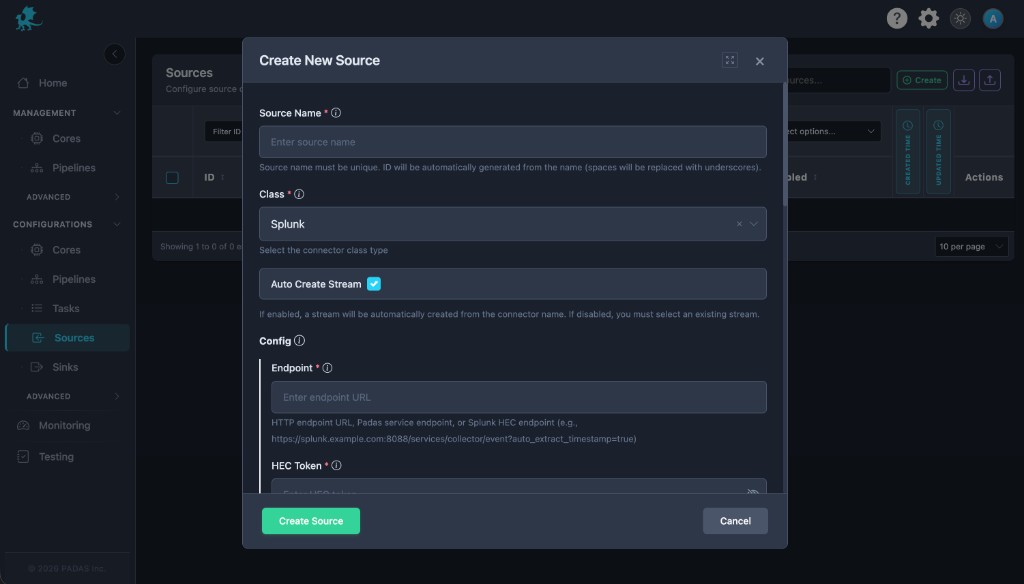
Set Class to Splunk, set name, stream behavior, and Enabled.
Enter Endpoint and HEC Token. For a sink, Endpoint is a Splunk base URL (https://splunk.example.com:8088). Set HEC time to event_time (default), auto_extract, or index_time.
Add TLS, headers, or batch limits from Common configuration when available.
Save, then wire the stream into tasks / pipelines.
hec_time — Sink only. event_time (default) sends the PADAS event timestamp as HEC root time. auto_extract asks Splunk to parse the nested event and omits root time (that parse depends on the sourcetype). index_time lets Splunk use receive time. Source connectors ignore this field.
tls — Verify Splunk server certificates in production.
authentication — Extra headers or schemes when HEC is wrapped.
batch — Keep posts under Splunk size and rate limits (common on sinks).
Connectors run after deployment; Disabled connectors do not listen or call HEC.
Source (HEC): 200 after enqueue, not after WAL/stream publish. Busy channel is 503 + HEC code 9 (UF/HF retry 5xx). Same bounded helper as HTTP server; HTTP server maps full to 429 instead.
Sinks should respect Splunk indexer health and 429 / throttle behavior via retries and batch caps where implemented.