Queries
Queries (/queries) is the query library: saved PDL definitions you maintain once and reuse across detection workflows. Detection tasks typically reference these rows by id so analysts and operators can centralize detection logic and shared rules without duplicating long PDL strings in every task.
What is a saved query?
| Concept | Description |
|---|---|
| Definition | A reusable PDL body stored under a stable name and id. |
| Consumers | Detection tasks select one or more saved queries and run them as independent conditions (Tasks). |
| Management | One place to author, review, and clone logic used in many deployments. |
| Composition | Definitions can be assembled from existing task or query text, then edited as a single saved unit. |
| Role | Building blocks for rule-style and multi-condition detection flows—not the same as inline processing PDL on a single task. |
Queries list
Open Queries. Use Create for a new saved query; filters match id, name, description, and PDL where supported. The footer controls paging.
Create → Create a query.
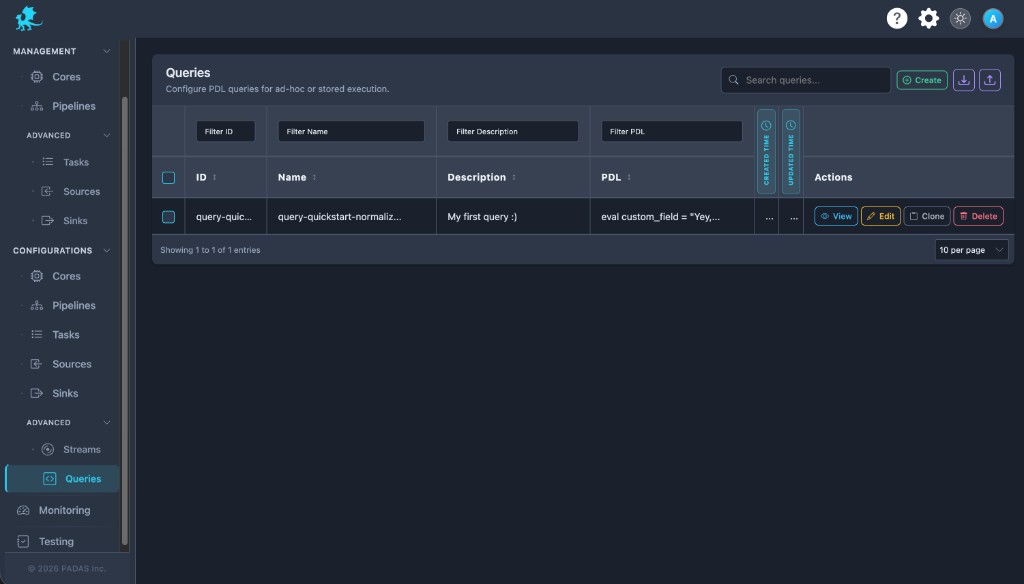
On these Configurations screens the layout is the same: Search and Create in the toolbar, Download / Upload for registry JSON (a full bundle can be imported from any tab), then a grid with filters on the row under the headers.
Each row has View (read-only), Edit, Clone, and Delete. Select multiple rows when you need bulk delete. Created and Updated time may show as narrow strips; use the control at the side of the table to expand or collapse those columns.
| Column | Description |
|---|---|
| ID | Stable query identifier (commonly derived from the name). |
| Name | Display label in the library. |
| Description | Short operator or analyst notes. |
| PDL | Saved PDL body (may be truncated in the grid). |
| Created time / Updated time | Audit timestamps. |
| Actions | View, Edit, Clone, Delete. |
Create a query
- Choose a unique Query Name (the UI derives the stable
id, typically spaces → underscores). - Add an optional Description (intent, owner, change reference).
- Write PDL in the editor, or use + Task / + Query to pull existing text in as a starting point (Query composition).
- Validate mentally against PDL Quick Reference / Reference; use Save when the body is complete.
- Reference the saved query ids from detection tasks when you configure those tasks (Reusing queries in tasks).
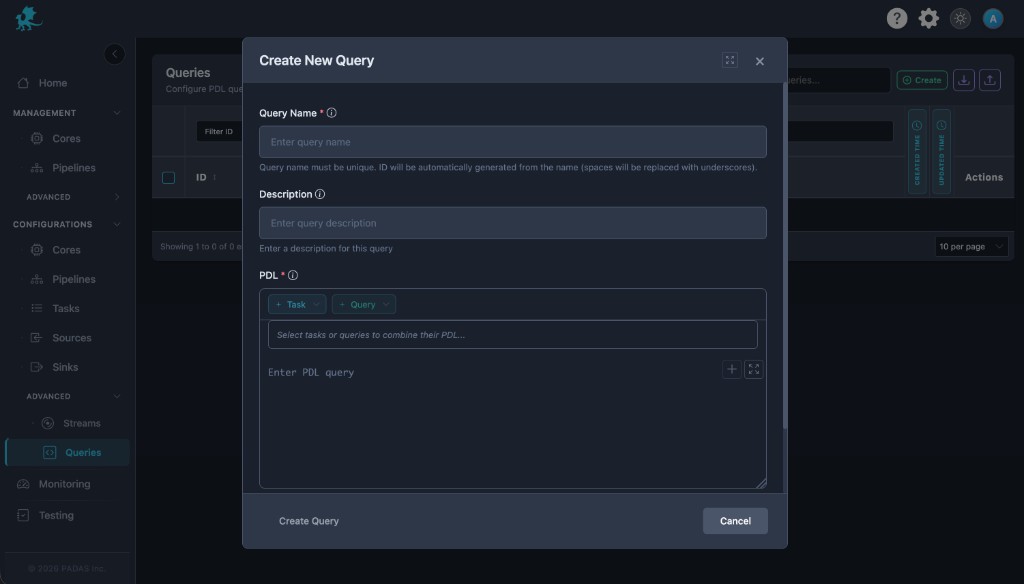
Query Name (required) — Must be unique among saved queries. Downstream tasks store references by id.
PDL (required) — The editor content is the single saved definition. Toolbar actions (for example expand / full screen) help with long pipelines.
Reusing queries in tasks
- Open Tasks in detection mode and select saved queries from the Queries multi-select; each entry is a named rule evaluated on its own.
- Changing PDL here updates the shared definition for every task that still points at that id—plan reviews accordingly.
- Processing tasks use inline PDL instead; they do not replace this library, but the same language references apply.
Query composition
+ Task and + Query (with pickers) insert PDL from an existing task or saved query into the current editor.
| Behavior | Detail |
|---|---|
| Purpose | Reuse proven snippets instead of retyping; start from a task export or another library entry. |
| Result | Inserted text becomes editable; you can merge, trim, or extend before Save. |
| Source of truth | Only what appears in the PDL editor is persisted—helpers do not maintain a separate hidden body. |
| Patterns | Build composite detection steps, standardize headers, or align field names across a query library. |
Validation and execution behavior
| Topic | Behavior |
|---|---|
| Empty PDL | Save is blocked when the PDL body is empty. |
| Syntax | Deep validation depends on engine / build capabilities (CLI, CI, or padas-pdl tools where available). |
| Runtime | Invalid or non-matching PDL surfaces when tasks execute or when deployment-time checks run—behavior follows your Core version. |
| Downstream impact | Tasks that reference a broken query may fail to deploy, error at runtime, or drop matches depending on failure mode—test after edits. |
Operational guidance
- Use consistent naming so ids stay discoverable in task pickers and change tickets.
- Prefer one shared query over copy-pasting the same PDL into many tasks.
- Review detection logic on a cadence; saved queries are the natural audit surface.
- Keep descriptions meaningful for handoff between analysts and operators.
- After importing an exported configuration bundle, open Queries here to spot-check PDL payloads before relying on them in production tasks.
Do not delete a query while tasks or deployments still reference its query id.
Related pages
- Tasks — detection vs processing and query attachment
- Pipelines — workflow context
- Streams — stream wiring next to tasks
- Motion Engine TOML — operator defaults alongside saved objects
- PDL comprehensive examples
- Glossary