Users, roles & permissions
This page covers operator login, roles, and permissions for Padas UI, the console. Operators sign in to the console; the console then reaches the engine using credentials from enrollment (not a token pasted into Cores). See Security and Cores.
Related: Security · REST API Reference · Motion Engine TOML · Cores · Monitoring · Troubleshooting & Logs · Glossary · Run a sample pipeline · Install Padas Motion
Overview
| Concern | Runtime behavior |
|---|---|
| Human authentication | POST /auth/login validates credentials (local users.json or LDAP bind); success issues session cookies (access_token / refresh_token). |
| Route-level authorization | Protected console routes require a valid session. Role checks use admin and user only. |
| Session lifecycle | Short-lived access token + refresh path; expired access may be renewed via refresh cookie until logout or secret rotation. |
| console as authorization boundary | console pages and APIs check the signed-in operator’s role before mutating configuration. |
| Human vs service identity | Operator login controls who may use the console. Enrollment controls how the console may call the engine—separate layers (Security). |
Initial admin bootstrap and first login
First-run flow: after licensing, the console creates empty {PADAS_UI_HOME}/data/security/users.json and secret.json if missing. Until users.local is non-empty, the sign-in surface shows System Not Initialized. GET /auth/init and POST /auth/init are reachable without a session—treat them as bootstrap attack surface on untrusted networks.
Why /auth/init matters: it is the only supported path to create the first local user with roles: ['admin']. GET /auth/init returns { "initialized": false } until a user exists; POST /auth/init accepts name, username, password, email and always assigns admin. If any user already exists → 409 Conflict. Operational hardening: after bootstrap, restrict /auth/init to a trusted network (ingress allowlist, reverse proxy ACL, or private admin VLAN).
JWT secret implications: secret.json defines signing trust for all future sessions. Loss or rotation without coordinated re-login invalidates existing sessions—plan secret rotation as a global sign-out event (see Operational identity management).
users.json persistence: bootstrap appends the first local user; subsequent CRUD goes through authenticated admin routes. Treat {PADAS_UI_HOME}/data/security/ as sensitive. Backup/restore: restore users.json and secret.json together—mismatched pairs break session verification.
curl -sS https://UI_HOST:9000/auth/init

curl -sS -X POST https://UI_HOST:9000/auth/init \
  -H "Content-Type: application/json" \
  -d '{"name":"Ops Admin","username":"admin1","password":"YourComplexPass1","email":"admin1@example.com"}'
After first login, register and enroll each engine under Services → Cores (Installation — padas-motion, Cores).
In the UI: session menu, profile, and password
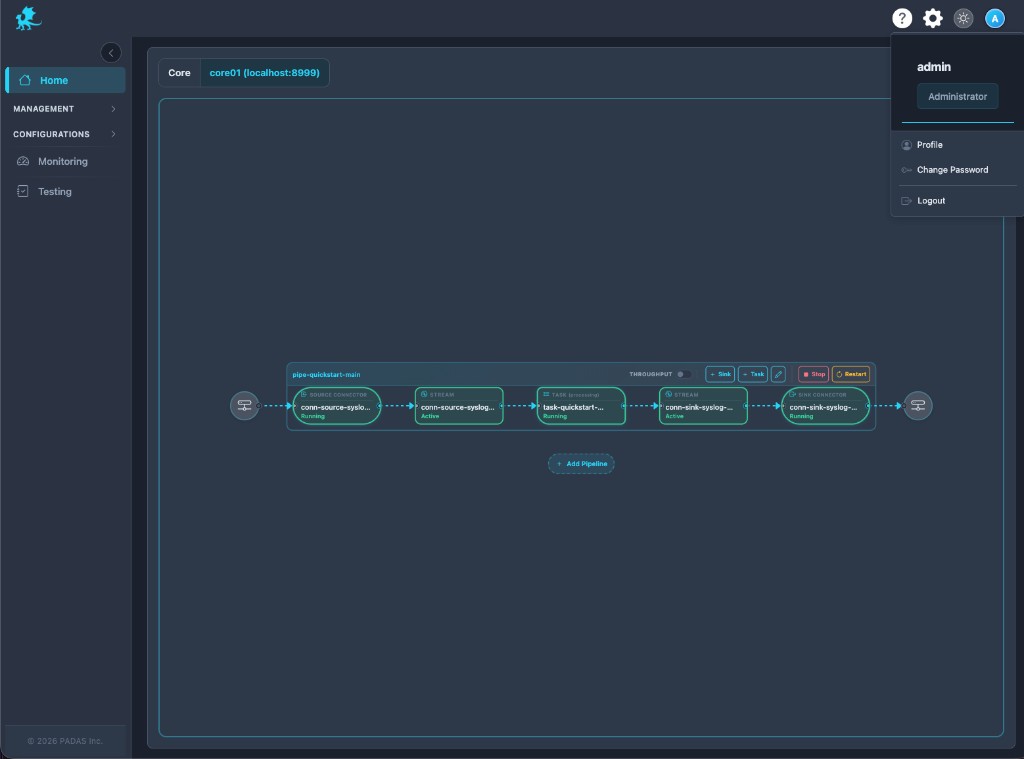
Header menu (role in context)
The header shows username and an Administrator badge when the session includes the admin role. This reflects the same roles array used for route authorization—not a separate privilege channel.
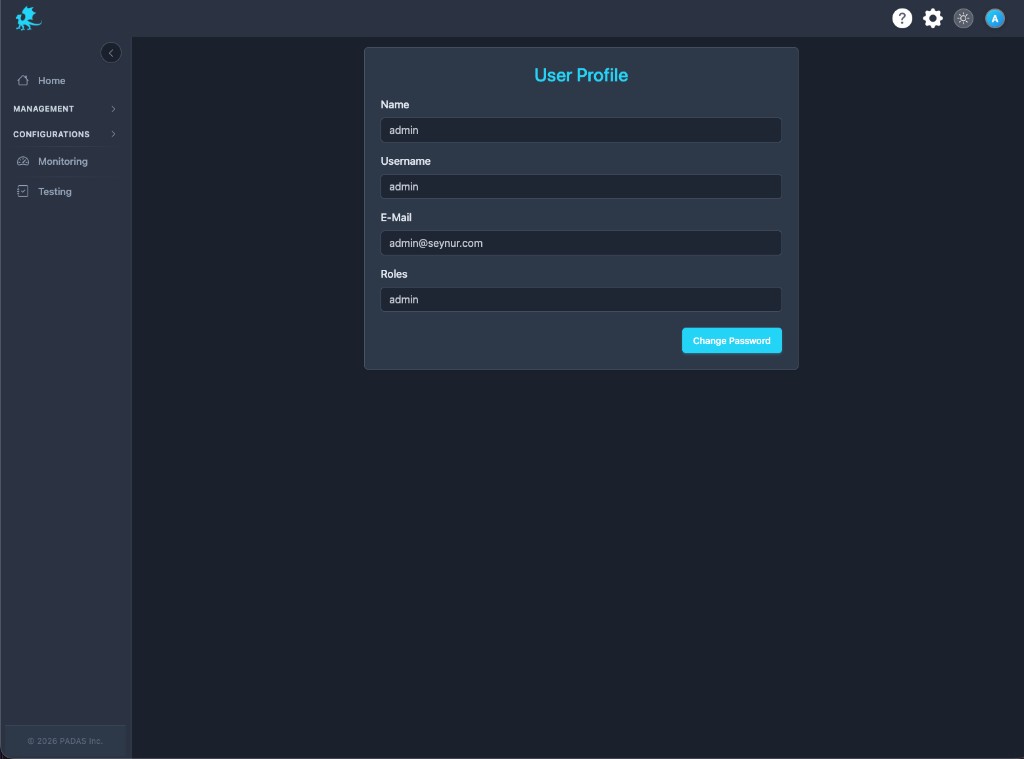
User profile
Profile shows Name, Username, E-Mail, and Roles from users.json for local users. LDAP-backed users see the same shape after bind—the console still issues a local session carrying roles. This screen mirrors persisted identity; it does not grant privilege by itself.
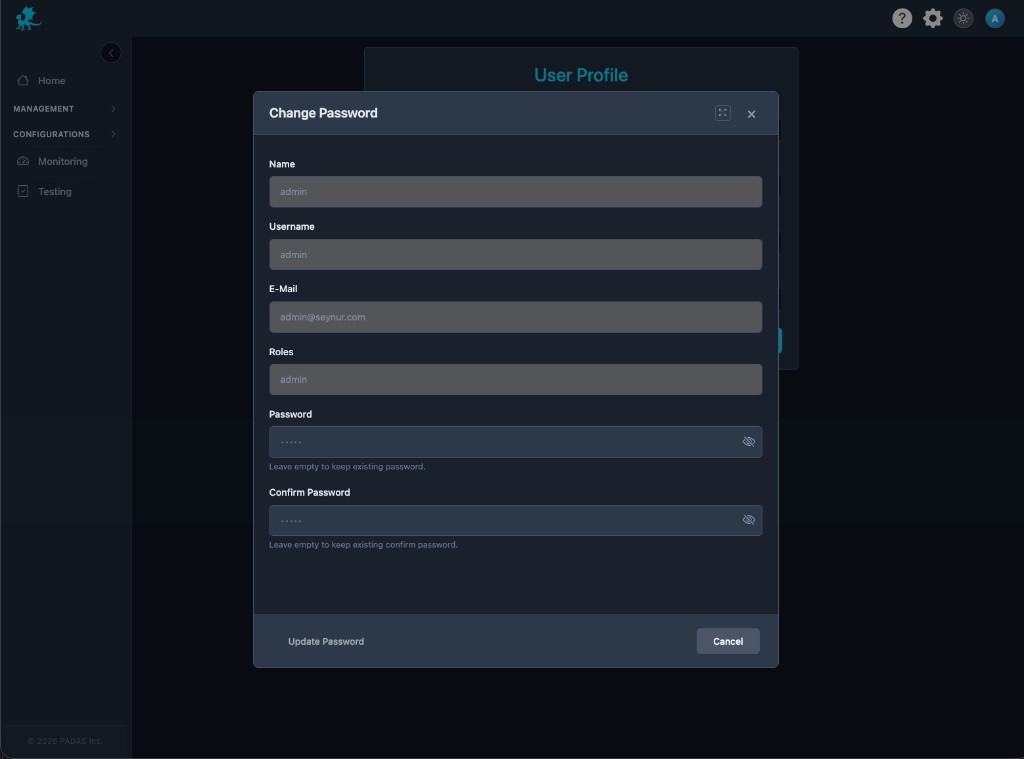
Change password
Change password is local-user self-service. A successful update changes the stored hash in users.json; existing sessions may remain valid until expiry—password rotation does not instantly revoke all sessions unless you also rotate secret.json or restart with session invalidation. LDAP directory passwords are not managed through this modal; use IdP flows.
Roles and console access
Runtime RBAC uses two role strings only: admin and user. Protected routes declare which roles may call them. Missing session → 401 Unauthorized; wrong role → 403 Forbidden.
| Surface | admin only | admin + user |
|---|---|---|
| Licenses | verify, list, add, delete | — |
| Users / LDAP / audit logs | list, CRUD | — |
POST /logs (client log ingest) | ✓ | — |
| Registry create/update/delete, bulk delete | ✓ | — |
| Registry GET | ✓ | ✓ |
| Management deploy / start / stop / restart | ✓ | ✓ |
Monitoring, captures, POST /test/run | ✓ | ✓ |
Why the engine does not enforce console roles: The engine authorizes HTTP API calls with service authentication from enrollment—not the operator’s console role. A signed-in operator can trigger console actions that call the engine only when enrollment and Cores registration are correct.
Current product limitations:
POST /auth/users(admin) currently creates new local users withadminrole only—least-privilegeusercreation via API is not supported yet.- LDAP sign-in assigns
adminfor authorization today—directory groups do not map touseryet.
Security implications:
| Topic | Behavior |
|---|---|
| Enrolled engine access | After enrollment, deploy and monitoring use the service identity on the engine host; console roles gate who may trigger those actions. |
| console compromise | Host-level compromise of PADAS_UI_HOME exposes secret.json, users.json, registry DB, and enroll registry—effective authority includes configuration deploy to enrolled Cores. |
| RBAC scope | No fine-grained resource ABAC; no per-Core segregation by role—authorization is route-wide. |
Multiple local users
Accounts live under users.json → local array entries with username, password hash, roles, and profile fields.
Admin / user role model: user can read registry and run deploy/monitor flows per route table; admin additionally manages users, LDAP settings, licenses, audit exports, and destructive registry operations. Prefer named operators over shared admin accounts where policy requires accountability.
Audit: mutating console API calls record the signed-in operator; correlate with Monitoring for incident review.
LDAP directory sign-in
When LDAP is configured, POST /auth/login can bind against the directory. Successful bind issues the same session cookies as local login—the browser never stores directory credentials for subsequent requests.
Role mapping: every LDAP session is admin-equivalent for authorization today. Identity provider trust: the console trusts the directory for password verification; directory outage surfaces as login failures, not engine errors.
Operational deployment: use LDAPS/TLS to the IdP, lock down LDAP config backups, and document fallback to a local admin during IdP incidents.
Runtime identity flow
| Step | Behavior |
|---|---|
| Browser login | Operator submits username / password to POST /auth/login. |
| Credential check | Local users.json or LDAP bind. |
| Session issuance | HTTP-only cookies carry signed access and refresh tokens. |
| Request authentication | Protected routes verify session signature and expiry. |
| Role authorization | Route checks roles against allowed list. |
| Engine API mediation | The console calls the engine on behalf of signed-in operators using enrollment credentials—not the operator’s session cookie. |
Trust boundaries and authorization model
| Boundary | Enforcement |
|---|---|
| Browser ↔ console | Operator session cookies + role checks on console routes. |
| console ↔ engine | Service authentication from enrollment; the engine does not enforce console roles. |
| Session vs engine Bearer | Session = operator to console; engine Bearer = direct API automation on the engine host—separate trust boundaries (Security). |
| Human identity vs service identity | Operator accounts vs enrollment on each engine. |
| Delegated authority | The console uses server-side enroll material for actions that call the engine—operators do not hold engine secrets in the browser. |
Operational identity management
- Password rotation: updates
users.json; outstanding sessions may persist until expiry—plan maintenance windows. - Admin account hygiene: avoid long-lived shared
adminaccounts. - Bootstrap recovery: fresh install with empty
users.localvs409on populated data—never mix proddata/security/with labsecret.jsoncasually. - Secret rotation: new
secret.jsoninvalidates all sessions—every operator must re-login. - console migration: move
{PADAS_UI_HOME}/data/security/atomically with the registry DB anddata/security/s2s/enroll state. - Backup sensitivity:
users.json,secret.json, registry DB, and enroll registry hold operational identity—encrypt backups and restrict restore RBAC.
Security considerations and troubleshooting
| Symptom | Likely cause |
|---|---|
| Expired session | 401 on protected routes; refresh or re-login required. |
| Cookie / session issues | Browser blocked cookies, wrong console origin, or refresh mismatch. |
| Invalid role errors | 403—session lacks required admin / user. |
| LDAP bind failures | Directory unreachable, bad bind DN/password, or TLS to IdP failing. |
Bootstrap conflicts (409) | POST /auth/init when a user already exists—expected guard. |
Corrupted users.json | JSON parse failures or manual edit errors—restore from backup. |
Lost secret.json | Cannot verify sessions; restore secrets backup or regenerate and force global re-login. |
| Auth redirect loops | Client repeatedly hitting protected routes without valid cookie—check reverse proxy cookie forwarding. |
| Stale sessions after role changes | Session still carries old roles until re-issue—re-login or wait for access token expiry. |
Deeper triage: Troubleshooting & Logs.
Related reading
- Security — trust boundaries, TLS, enrollment, runtime API exposure
- REST API Reference — engine Bearer for direct API clients
- Glossary — JWT session, enrollment, service account token
- Motion Engine TOML —
PADAS_UI_HOME, engine connectivity context - Cores — engine registration and enroll
- Monitoring — correlating auth errors with pipeline health
- Troubleshooting & Logs — session, TLS, and reachability playbooks